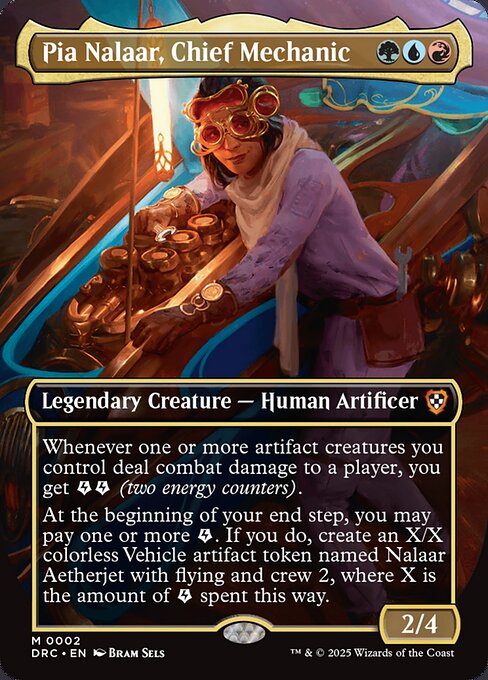
Pia Nalaar, Chief Mechanic 


Legendary Creature — Human Artificer2/4
Oracle text (EN)
Legendary Creature — Human Artificer
Whenever one or more artifact creatures you control deal combat damage to a player, you get  (two energy counters).
At the beginning of your end step, you may pay one or more . If you do, create an X/X colorless Vehicle artifact token named Nalaar Aetherjet with flying and crew 2, where X is the amount of paid this way.
(two energy counters).
At the beginning of your end step, you may pay one or more . If you do, create an X/X colorless Vehicle artifact token named Nalaar Aetherjet with flying and crew 2, where X is the amount of paid this way.
Printing details
- Set
- DRC · 2
- Rarity
- Mythic
- Language
- EN
- Artist
- Bram Sels
- Released
- 2025-02-14
- Prices
- €0.24 · $0.27
Price history
The trend shows with at least 7 days of history.
- Cardmarket, trend
- CardTrader, Near Mint minimum (EN)
The history starts on October 28, 2026 and grows every day.
Show the data
| Date | Cardmarket, trend | CardTrader, Near Mint minimum (EN) |
|---|---|---|
| October 30, 2026 | €0.22 | €0.11 |
| October 28, 2026 | €0.24 | €0.11 |
Prices
| Source | Non-foil | Foil |
|---|---|---|
| Cardmarket | low – trend €0.22 30-day avg €0.23 | low – trend €0.15 30-day avg €0.23 |
| CardTrader (EN) | NM from €0.11 with Zero from €0.16 | NM from €0.11 with Zero from €0.11 |
| CardTrader (any language) | NM from €0.11 | NM from €0.11 |
Cardmarket updated Oct 30, 2026 · CardTrader updated Oct 30, 2026
Buy and look up
Legality
- standard Not legal
- pioneer Not legal
- modern Not legal
- legacy Legal
- vintage Legal
- commander Legal
- pauper Not legal
- alchemy Not legal
- brawl Legal
- competitivebrawl Legal
- duel Legal
- future Not legal
- gladiator Legal
- historic Legal
- oathbreaker Legal
- oldschool Not legal
- paupercommander Not legal
- penny Not legal
- predh Not legal
- premodern Not legal
- standardbrawl Not legal
- timeless Legal
- tlr Legal
Rulings
- is the energy symbol. It represents one energy counter.
-
Some spells and abilities say that you “may pay” a certain amount of
, then describes an effect that happens “if you do.” In that case, no player may take actions to try to stop the ability’s effect after you make your choice. If the payment is instead followed by the phrase “when you do” followed by an effect, then after you choose to pay , a new triggered ability called a reflexive trigger is put on the stack, and you choose targets for the reflexive trigger (if the effect asks for targets). Players may respond as normal to this new triggered ability. Once that reflexive trigger resolves, the effect will finally occur. -
Some spells and abilities which give you
or say you “may pay” some amount of require one or more targets. If each target chosen is an illegal target as that spell or ability tries to resolve, it won’t resolve. None of its effects will happen, you won’t get any from it, and you won’t get the chance to pay any for its effects even if you want to. -
Keep track of how many energy counters each player has. Potential ways to track this include writing them down on paper or using dice, but any method that is clear and mutually agreeable is fine.
-
Energy counters aren’t mana. They don’t go away as steps, phases, and turns end, and effects that add mana “of any type” can’t give you energy counters.
-
Energy counters are a kind of counter that a player may have. They’re not associated with any specific permanents.
-
If an effect says you get one or more
, you get that many energy counters. To pay one or more , you lose that many energy counters. You can’t pay more energy counters than you have. Any effects that interact with counters a player gets, has, or loses can interact with energy counters. -
Some spells and abilities say that you “may pay” a certain amount of
. You can’t pay that amount multiple times to multiply the effect. You simply choose whether or not to pay that amount of as the ability resolves.